
WaveRider for homes and offices
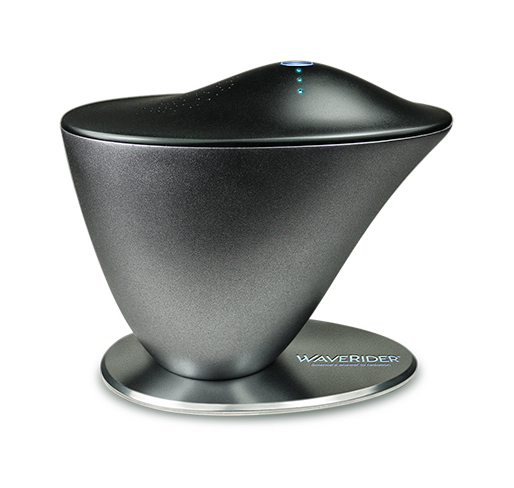
WaveRider plugs into a wall socket at home or work. Its core is rated for 17,520 operating hours. Our Singapore team can replace the core when it wears out. See how to set up your unit and read its lights.
US$1,790.00
For a delivery quote, include your country in your message.
Specifications and setup
Operating life and stated range
At 10 hours a day, the core’s rated life works out to about 4.8 years. At 15 hours a day, it’s about 3.2 years.
The manufacturer lists a 9-metre radius. Health protection at that distance remains unverified in the studies WaveRider cites.
Specifications
- Net weight
- 650 g
- Weight with packaging
- 1,000 g
- Packaging dimensions
- 25.5 × 16.5 × 13.5 cm
- Input voltage
- 110–240 V, 50–60 Hz
- Adapter output
- 12 V DC, 350 mA
- Warranty
- 1 year
- Manufacturer’s stated range
- 9 m radius
Set up your WaveRider and check its lights
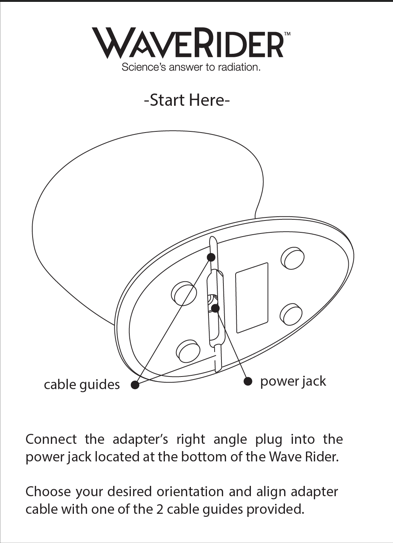
- Connect the supplied adapter to the socket underneath the unit. Tuck the cable into either guide.
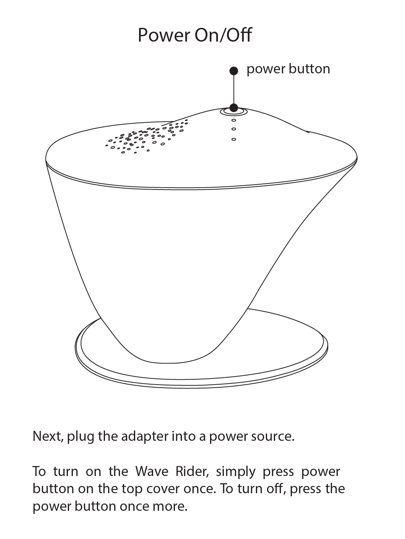
- Plug the adapter into a wall socket. Press the button on top once to switch the unit on and again to switch it off.
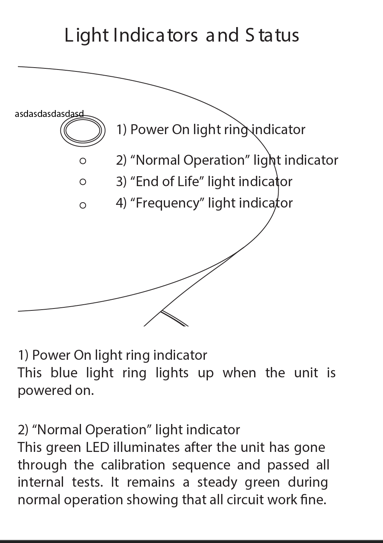
The blue ring lights up when the power is on. A steady green light means the unit has passed its startup checks. The frequency light alternates between green and yellow.
On the model shown here, a flashing red light means roughly 200 operating hours remain. When the light stays red, arrange a core replacement. Check your unit’s manual if its lights differ.
View the manual page for the red and frequency lights. The range on that page is the manufacturer’s claim.

Technology and research
In the design WaveRider describes, a powered coil called a solenoid excites a polymer. The company describes the resulting low-frequency oscillations as a noise field.
See the design in U.S. Patent 8,044,376 and the experiments on the studies and testing page.
Arrange a consultation
If you’d like to talk through setup for a specific room, ask the team for a consultation.